DK11 Login refers to the process of accessing an existing account on the DK11 platform. It allows returning users to enter their personal account area and explore the features available after signing in.
The available DK11 interface displays an Account section in the bottom navigation menu, alongside other options such as Wallet, Promotion, and Activity. These sections provide access to different areas of the platform.
However, the exact login form and required credentials have not been confirmed through the currently available website information. Therefore, this guide does not assume specific login fields, verification procedures, or account recovery options.
The following guide covers general account access information, common login difficulties, and mobile browsing considerations to help users better understand the DK11 login process.
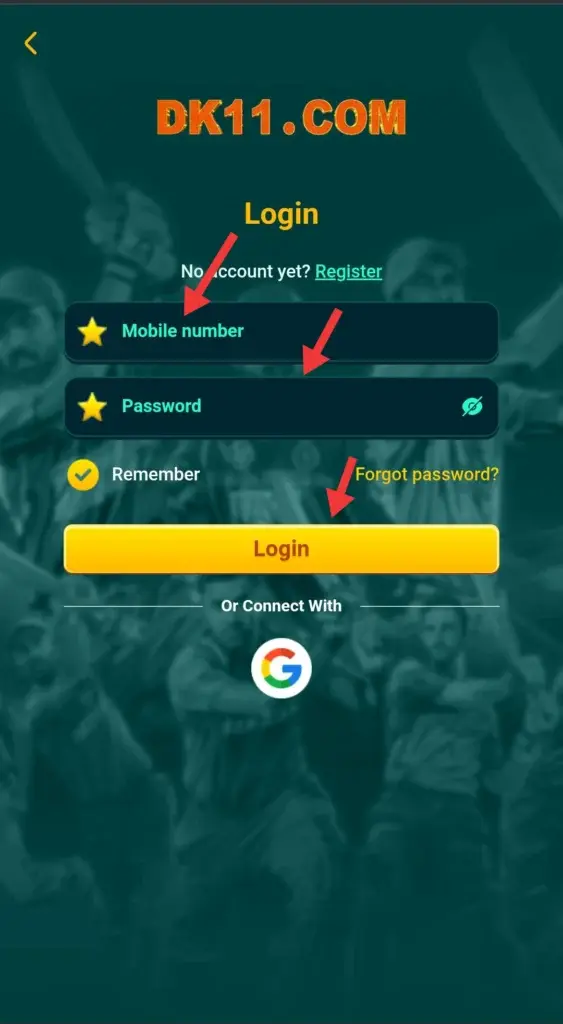
What Does DK11 Login Mean?
DK11 Login is the process of accessing an already registered account on the DK11 platform.
Users who have previously created an account can use the login option to return to their existing account instead of going through registration again. Once access is successful, they can navigate to the account features available on the platform. The DK11 interface includes a dedicated Account section in its main navigation, making account-related options easier to find.
For a safer experience, always use the login facility provided through a verified DK11 website or application. Avoid entering personal details on copied login pages, suspicious links, or unrelated third-party websites.
Where Can You Access DK11 Login?
Users should access their account through the DK11 platform they normally use.
The official website provided for this project is:
The current public crawl of the homepage does not expose a separate login form or login URL.
Because of this, an exact direct login URL should not be invented. If the platform displays a Login option when accessed normally, users should use that option.
How to Log In to DK11 Game?
The exact fields on the DK11 login screen have not been confirmed from the available information. Therefore, the safest approach is to follow the fields and instructions displayed by DK11 itself.
A basic login process is:
1. Open DK11
Start by opening the DK11 platform using the current official website or the access method already associated with your account.
2. Find the Account or Login Option
Look for the account-related option on the platform. The supplied DK11 interface includes an Account option in the bottom navigation.
3. Enter Your Account Information
Use the information requested by the current login form.
Do not assume that DK11 requires a particular type of username or identification unless the login screen specifically shows it.
4. Submit the Login Form
After entering the requested information, follow the on-screen instruction to continue.
5. Check Your Account Area
If the login is successful, you should be taken to the account area or another part of the platform associated with your account.
The exact screen after login can vary depending on the current version of the platform.
What Information Is Normally Required for Login?
A login system normally requires account information that was created or provided during registration. However, the exact DK11 login requirements are not confirmed from the available website information.
For that reason, users should enter only the information specifically requested on the DK11 login screen.
If a form asks for information that you do not recognize, check the page carefully before submitting anything.
Also make sure that your login information is entered correctly. A small typing mistake can prevent an otherwise valid account from being accessed.
DK11 Login Not Working? Try These Steps
A failed login does not always mean that there is a problem with the account. Simple input or access issues can also prevent a successful sign-in.
Check Your Account Information
Review the information you entered and make sure there are no typing mistakes.
Pay particular attention to extra spaces, incorrect characters, and accidentally entered information from another account.
Refresh the Login Page
If the page does not respond correctly, refresh it and try again.
This can help when the page has not loaded completely or a temporary browser problem occurs.
Check Your Internet Connection
A weak or interrupted connection can prevent the login request from being completed.
Try loading another page first to confirm that your connection is working normally.
Reopen the DK11 Platform
Close the current page and open the DK11 platform again. Then try the login process from the beginning.
Check for Platform Changes
If the login page looks different from the one you previously used, follow the current instructions shown by DK11 instead of relying on an older guide.
Password and Account Access Guidance
Keep your account login information private.
Do not send your password to another person simply because they offer to help with account access. If you cannot remember your password, use a recovery option only if one is actually provided on the current DK11 login page.
The available information does not confirm a specific DK11 password-reset process, recovery link, verification method, or customer-support procedure. Therefore, those details should be checked directly on the current platform rather than guessed.
If you are already logged in on a device, avoid changing account information unless you understand what the change will affect.
DK11 Login on Mobile
The supplied DK11 interface is clearly arranged for mobile use. It uses a mobile-style layout with game sections and a bottom navigation bar containing Promotion, Activity, Wallet, and Account.
This makes account navigation accessible from a phone-sized screen.
For mobile login, open the current DK11 platform and use the account/login option displayed there. The exact mobile login fields should be taken from the current interface because the available information does not confirm whether the mobile and desktop login processes use identical fields.
There is also no verified information here about a particular APK version, file size, Android requirement, or iOS application, so those details should not be assumed when discussing DK11 Login.
Common DK11 Login Questions
What is DK11 Login?
DK11 Login is the process of accessing an existing DK11 account. It is different from registration, which is used to create a new account.
Where is the DK11 Account option?
The supplied DK11 interface shows Account in the bottom navigation. Selecting the account area is the appropriate starting point for account-related functions.
Why can I not log in to DK11?
Possible reasons include incorrect account information, a temporary connection problem, a page-loading issue, or changes to the current login process. Check the information entered and follow the instructions currently shown by DK11.
Can I use DK11 Login on a mobile phone?
The supplied DK11 interface is designed for a mobile screen, including a bottom navigation menu. Users should access the current platform and follow its displayed account/login process.
What should I do if I forget my password?
Check the current DK11 login page for an available account-recovery or password-reset option. A specific recovery method cannot be confirmed from the information currently available, so it should not be assumed.
Final Words
DK11 Login serves as the entry point for returning users who want to access an existing account. The platform’s mobile interface features a separate Account option, allowing users to locate account-related functions from the main navigation menu.
To sign in, visit the verified DK11 platform and follow the instructions displayed on its current login screen. Do not assume that specific credentials, verification options, or account recovery methods are available unless they are clearly provided by the platform.
If you experience login difficulties, check your entered details, internet connection, and page loading. You should also review any instructions displayed by the platform. Always keep your account credentials private and avoid entering personal information on suspicious or unofficial login pages.