
Withdrawing funds is an important part of understanding any online gaming platform. Before submitting a withdrawal request, users should understand the available payment methods, account requirements, payment details, transaction statuses, and possible reasons for delays.
This detailed DK11 Game Withdrawal Guide explains the general withdrawal process using JazzCash, EasyPaisa, and bank transfers. It also covers account verification, payment safety, common withdrawal problems, and practical steps to follow when a transaction does not go as expected.
Whether you are new to the platform or already have an account, this guide can help you understand the withdrawal procedure and avoid common mistakes.
- Understanding DK11 Game Withdrawals
- Requirements Before Making a Withdrawal
- How to Withdraw from DK11 Game?
- DK11 Game JazzCash Withdrawal Guide
- DK11 Game EasyPaisa Withdrawal Guide
- DK11 Game Bank Transfer Withdrawal Guide
- Account Registration and Verification
- How to Check Your Withdrawal Status?
- Common DK11 Game Withdrawal Problems and Solutions
- Withdrawal Safety and Security Tips
- Frequently Asked Questions About DK11 Game Withdrawals
- Final Words
Understanding DK11 Game Withdrawals
A withdrawal is a request to transfer an eligible account balance from a gaming platform to an external payment account. Depending on the platform’s current rules, users may be able to choose from different payment options.
DK11 Game users should check the withdrawal section of their account to confirm which payment methods are currently supported, what information is required, and whether any conditions apply.
Before proceeding, it is also useful to understand how to access the platform and its features. If you need the application, visit the [DK11 Game Download Page] for information about accessing the app.
Requirements Before Making a Withdrawal
Before submitting a withdrawal request, review the following points:
1. Access to Your Account
You should be able to access your account using your registered login details. If you have trouble accessing your account, check your credentials and follow the official account-recovery instructions.
2. Correct Payment Information
Your JazzCash, EasyPaisa, or bank account details should be entered accurately. Incorrect information may cause a transaction to be delayed or rejected.
3. Account Verification
Some platforms may require account verification before allowing withdrawals. Follow the verification instructions displayed in your account and provide only the information officially requested.
4. Withdrawal Rules
Review the platform’s current withdrawal terms, including any eligibility conditions, minimum or maximum amounts, fees, and applicable restrictions. These details can change, so rely on the information displayed in your account rather than unofficial claims.
How to Withdraw from DK11 Game?
The following steps explain the general withdrawal procedure. Exact menu names and available options may differ depending on the current version of the platform.
Step 1: Open the DK11 Game Platform
Visit the official DK11 Game website or open the application. Make sure you are using the correct platform and avoid unofficial websites or third-party applications.
Step 2: Log In to Your Account
Enter your registered account details and access your account dashboard. If you need help with account access, read the [DK11 Game Login Guide] for general login instructions.
Never share your password, PIN, or one-time verification code with another person.
Step 3: Open the Wallet or Withdrawal Section
After logging in, look for the Wallet, Balance, Payments, or Withdrawal section. The exact name may vary.
Review the available balance and the withdrawal options displayed on your account.
Step 4: Select a Payment Method
Choose one of the payment methods currently supported by the platform. Depending on availability, these may include JazzCash, EasyPaisa, or bank transfer.
Step 5: Enter Your Withdrawal Details
Provide the payment information requested by the platform. Check every number and account detail carefully before continuing.
Step 6: Enter the Withdrawal Amount
Enter an amount that meets the platform’s displayed withdrawal conditions. Review any applicable fees or restrictions before submitting your request.
Step 7: Review and Submit
Carefully check the payment method, receiving account details, and requested amount. Submit the request only after confirming that all information is correct.
Step 8: Save Your Transaction Reference
After submitting your request, save the transaction ID, reference number, or confirmation message. These details may be useful if you need to contact customer support.
DK11 Game JazzCash Withdrawal Guide
JazzCash is a commonly used mobile payment service in Pakistan. If JazzCash is available in your DK11 Game withdrawal section, you may be able to use it by following the platform’s displayed instructions.
General JazzCash Withdrawal Steps
- Open the withdrawal section.
- Select JazzCash if it is listed as an available method.
- Enter the required JazzCash account or mobile number.
- Confirm that the number is accurate.
- Enter the amount permitted by the platform.
- Review the details and submit your request.
- Save the confirmation or transaction reference.
JazzCash Withdrawal Tips
- Use the correct receiving account details.
- Check the mobile number before submission.
- Make sure the account is accessible to you.
- Review any displayed withdrawal conditions.
- Keep a record of your transaction.
If a payment is delayed, check the transaction status first. If necessary, contact official platform support and provide your transaction reference.
DK11 Game EasyPaisa Withdrawal Guide
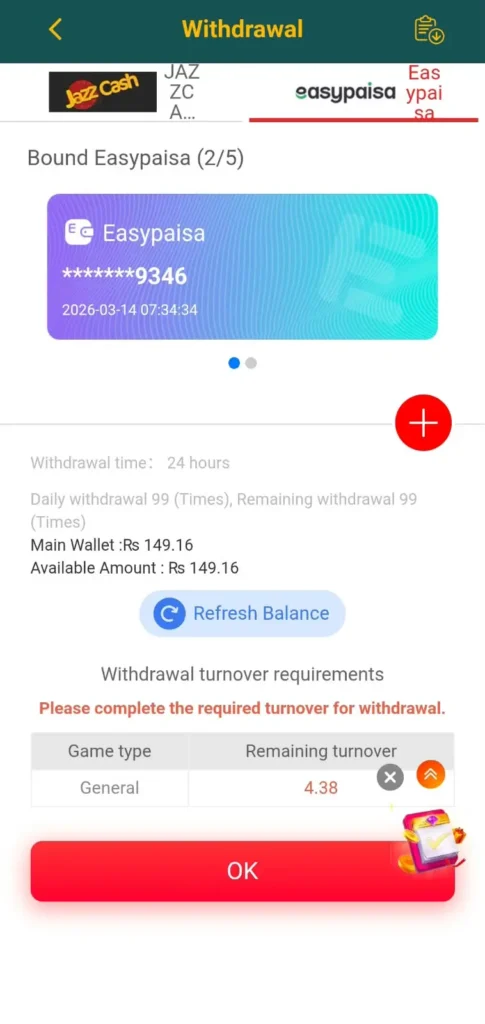
EasyPaisa is another mobile payment service used in Pakistan. If the platform currently supports EasyPaisa withdrawals, check the instructions displayed in your account before submitting a request.
General EasyPaisa Withdrawal Steps
- Access your account.
- Open the withdrawal or wallet section.
- Select EasyPaisa if available.
- Enter your correct EasyPaisa account information.
- Review the withdrawal amount and payment details.
- Submit the request after checking everything carefully.
- Save the transaction confirmation.
Avoiding EasyPaisa Withdrawal Errors
Incorrect account information is one possible reason for payment problems. Always double-check the receiving number and ensure that you have access to the account.
Do not share your EasyPaisa PIN or OTP with anyone claiming to process a withdrawal on your behalf.
DK11 Game Bank Transfer Withdrawal Guide
Some platforms may offer bank transfers as a withdrawal option. If this method is available in your account, you may need to provide banking information.
Information That May Be Required
- Account holder’s name
- Bank name
- Account number or IBAN
- Additional details requested by the platform
General Bank Withdrawal Procedure
- Open the withdrawal section.
- Select bank transfer if it is available.
- Enter the requested banking information.
- Verify the account holder’s name and account details.
- Enter the eligible amount.
- Review any applicable conditions or fees.
- Submit the request and save the reference number.
Make sure the bank account information is accurate. If you are unsure about any requested field, confirm its meaning through your bank or the platform’s official support channel.
Account Registration and Verification
Account information plays an important role in payment processing. Users should make sure their registration details are accurate and follow any verification requirements shown by the platform.
If you are new and need information about account creation, visit the [DK11 Game Register Guide] for general registration instructions.
Do not create multiple accounts to bypass restrictions or verification requirements. Follow the platform’s official account rules and provide truthful information whenever verification is requested.
How to Check Your Withdrawal Status?
After submitting a withdrawal request, you should check its status through the transaction history, wallet, or withdrawal section.
Common transaction statuses may include:
Pending
A pending request has been submitted but has not yet reached a completed status. Check whether the platform displays any additional instructions.
Processing
The transaction is being handled. Keep your transaction reference and check the status again according to the platform’s guidance.
Completed
The platform has marked the withdrawal as completed. If the money has not appeared in your receiving account, confirm the payment details and contact the relevant support team.
Rejected
The request has not been approved. Review the displayed reason and check whether the account information, verification status, or withdrawal conditions need attention.
Common DK11 Game Withdrawal Problems and Solutions
Even when users enter their information carefully, payment issues can sometimes occur. The following explanations cover common situations and the steps users can take.
1. Withdrawal Request Is Pending
A pending request may be waiting for review or processing.
What to do:
- Check the latest transaction status.
- Review any notifications in your account.
- Keep your transaction reference.
- Contact official support if the request remains unresolved.
2. Incorrect JazzCash or EasyPaisa Number
An incorrect mobile number may prevent a payment from reaching the intended account.
What to do:
- Review the number entered in the withdrawal request.
- Confirm the receiving account details.
- Contact official support if the request has already been submitted.
3. Bank Account Details Are Incorrect
Incorrect account numbers, IBANs, or account holder information may cause transfer issues.
What to do:
- Compare the submitted details with your bank records.
- Check the platform’s transaction status.
- Ask official support for guidance before submitting another request.
4. Withdrawal Request Is Rejected
A request may be rejected because of incorrect details, incomplete verification, eligibility conditions, or other platform rules.
What to do:
- Read the rejection message carefully.
- Check your account information.
- Review the current withdrawal requirements.
- Contact official support if the reason is unclear.
5. Completed Payment Has Not Arrived
A completed status on the platform does not necessarily mean the funds have already appeared in your external payment account.
What to do:
- Confirm the receiving account details.
- Review the transaction reference.
- Contact the platform’s official support.
- Contact your payment provider if necessary.
Withdrawal Safety and Security Tips
Keeping your account and payment information secure is essential. Follow these precautions whenever you use a payment feature.
- Use only official platform channels.
- Never share your password, PIN, or OTP.
- Avoid sending money to unofficial agents.
- Do not provide payment information to unknown individuals.
- Check all receiving account details before submitting a request.
- Save transaction references and confirmation messages.
- Read the latest withdrawal terms and conditions.
- Be cautious of anyone promising guaranteed withdrawals, profits, or winnings.
Remember that online gaming may involve financial risk. Only participate where legally permitted, understand the risks, and never use money you cannot afford to lose.
Frequently Asked Questions About DK11 Game Withdrawals
Which withdrawal methods are available on DK11 Game?
JazzCash, EasyPaisa, and bank transfer are the methods covered in this guide. Actual availability depends on the options currently displayed in your account.
How do I withdraw money from DK11 Game?
Open your account, visit the withdrawal section, select an available payment method, enter the requested details, review the information, and submit your request.
Can I withdraw through JazzCash?
If JazzCash is listed in your account’s withdrawal options, follow the instructions shown there and verify your receiving mobile number before submitting a request.
Can I withdraw through EasyPaisa?
If EasyPaisa is supported, select it from the available methods and enter the correct account details.
Is bank transfer available?
Bank transfer availability depends on the platform’s current payment options. Check your withdrawal section for confirmation.
Why is my withdrawal still pending?
A request may remain pending while it is awaiting review or processing. Check the transaction status and contact official support if you need further assistance.
What should I do if my withdrawal is rejected?
Review the rejection message, verify your account and payment information, and follow the official instructions provided by the platform.
Is every withdrawal guaranteed?
No. Withdrawals may depend on eligibility, verification, platform policies, payment-provider procedures, and applicable legal requirements.
Should I share my OTP with customer support?
No. Never share your OTP, password, or payment PIN with anyone.
Final Words
This DK11 Game Withdrawal Guide provides an overview of the general withdrawal process, including JazzCash, EasyPaisa, and bank transfers. Understanding the payment steps, checking account information, and keeping transaction records can help users avoid common mistakes.
Always confirm the current withdrawal methods and requirements through your account’s official payment section. If a transaction does not proceed as expected, use official support channels and provide your transaction reference for assistance.