
Welcome to the DK11 Game Deposit Guide. This comprehensive guide is designed to help users understand the deposit process, available payment options, transaction verification, common payment issues, and important security precautions.
Whether you are familiar with mobile payments or making an online transaction for the first time, understanding how deposits work can help you avoid common mistakes and protect your financial information.
DK11 Game users may find different payment options depending on the availability of services in their accounts, including JazzCash, EasyPaisa, and Bank Transfer.
Before making any payment, always verify the platform’s legitimacy, applicable local laws, and the payment instructions provided through its official channels.
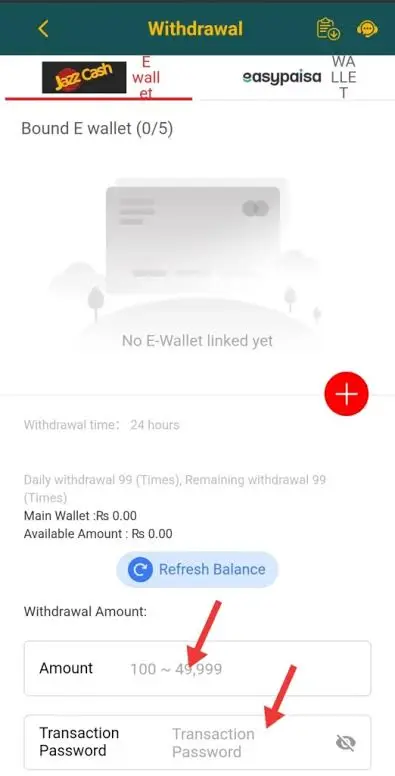
- Understanding the DK11 Game Deposit Process
- Available Deposit Payment Methods
- Step-by-Step Deposit Instructions
- Minimum and Maximum Deposit Limits
- Deposit Processing Time
- How to Check Your Deposit Status
- Common Deposit Problems and Their Solutions
- Important Payment Security Tips
- Frequently Asked Questions (FAQs)
- Responsible Financial Practices
- Final Words
Understanding the DK11 Game Deposit Process
A deposit is a payment transaction through which a user transfers money to an account or platform balance.
The general deposit process involves three main stages:
- Selecting an available payment method.
- Completing the payment through the relevant payment provider.
- Waiting for the transaction to be verified and reflected in the account, if applicable.
Each payment method may have different processing procedures. Therefore, users should carefully follow the instructions displayed during the transaction.
Ready to explore DK11 Game? Visit our DK11 Game Download Page to learn more about the app, its features, installation process, and compatibility.
Available Deposit Payment Methods
Users may encounter the following payment methods, depending on the options currently supported by the platform.
JazzCash Deposit
JazzCash is a mobile financial service in Pakistan that allows users to make digital transactions through supported services.
If JazzCash is available in your account, follow these general precautions:
- Open your account’s payment or deposit section.
- Check whether JazzCash is listed as an available option.
- Read the displayed payment instructions carefully.
- Verify the recipient information and transaction amount.
- Complete the transaction only through the verified payment channel.
- Save the transaction confirmation or receipt.
- Check the transaction status before attempting another payment.
Important: Never transfer money to an unverified personal number or account. Confirm the recipient details through an independently verified official channel.
EasyPaisa Deposit
EasyPaisa is another widely used digital payment service in Pakistan.
If the platform supports EasyPaisa, users should:
- Check the available EasyPaisa payment option.
- Review the payment instructions.
- Verify the recipient’s details.
- Confirm the amount before authorizing the transaction.
- Keep the transaction ID or receipt.
- Check whether the transaction has been completed successfully.
Do not share your EasyPaisa PIN, OTP, or account password with anyone.
Bank Transfer
Bank transfers may be available through supported banking channels.
Before transferring money:
- Verify the account holder’s name.
- Check the bank account or IBAN carefully.
- Confirm the payment amount.
- Review any applicable transfer charges.
- Keep the bank transaction reference.
- Make sure the recipient information is verified.
Bank transfers may take longer to process than some mobile wallet transactions, depending on the banking service and transaction verification requirements.
Already have an account? Visit the DK11 Game Login Page to learn how to access your account using your registered login credentials.
Step-by-Step Deposit Instructions
The following is a general guide to understanding an online deposit process. Actual steps and availability may differ depending on the platform.
Access Your Account
- Visit the platform through a verified official website and sign in using your own account credentials.
- Never enter your login information on unfamiliar websites or links received through unsolicited messages.
Find the Payment Section
- Look for the Deposit, Payments, or Wallet section, if available.
- Review the available payment methods before proceeding.
Select a Payment Method
- Choose from the payment options actually displayed in your account, such as JazzCash, EasyPaisa, or Bank Transfer.
- Do not assume that every method is available to every user.
Review Payment Information
- Carefully check the payment instructions, recipient information, transaction limits, and any applicable fees.
- If any information appears suspicious or inconsistent, stop and contact verified support.
- Step 5: Verify the Transaction
- Before confirming a payment, double-check the recipient and amount.
- Once a transfer is authorized, reversing it may not always be possible.
Save Your Receipt
- Keep your payment confirmation, transaction reference, and date of payment.
- These details may be necessary if you need to report a delayed or unsuccessful transaction.
Step 7: Check Transaction Status
- Review the payment status through the account’s transaction history, if available.
- Do not make another payment simply because the first transaction has not appeared immediately.
Minimum and Maximum Deposit Limits
Deposit limits can vary depending on the payment provider, account restrictions, platform policies, and applicable regulations.
Users should check the currently displayed limits before making any transaction.
Important things to consider include:
- Minimum permitted transaction amount.
- Maximum permitted transaction amount.
- Daily or monthly transaction limits.
- Payment provider fees.
- Account verification requirements.
Never rely on deposit limits published by unofficial websites or outdated guides.
Deposit Processing Time
Payment processing times are not always identical.
Several factors can affect how quickly a transaction is completed:
JazzCash: Processing depends on the payment service and successful transaction confirmation.
EasyPaisa: Delays may occur because of payment verification, service interruptions, or transaction restrictions.
Bank Transfer: Processing may depend on the bank, transfer type, banking hours, and verification procedures.
A successful payment notification from a payment provider does not necessarily mean that a separate platform account has already been credited.
Always check both the payment provider’s transaction record and the platform’s payment status.
New to DK11 Game? Visit the DK11 Game Registration Page to understand the registration requirements, account information, and important security precautions before creating an account.
How to Check Your Deposit Status
If a transaction has been initiated, you should retain its reference information.
Follow these general steps:
- Access your account through the verified website.
- Find the transaction history or payment records.
- Locate the relevant transaction.
- Review its displayed status.
- Compare the transaction details with your payment receipt.
- Contact verified support if the status remains unclear.
Common transaction statuses may include:
Pending: The transaction is awaiting confirmation or verification.
Successful: The payment provider has reported a completed transaction. Any separate platform credit should still be verified.
Failed: The transaction was not completed successfully.
Under Review: Additional verification may be required.
Common Deposit Problems and Their Solutions
Payment Deducted but Account Not Updated
This can happen because of processing delays, payment verification, or technical issues.
What to do:
- Check your payment provider’s transaction history.
- Save the payment receipt.
- Record the transaction reference.
- Check your account’s payment history.
- Contact verified support with the relevant transaction details.
Avoid making another payment until the first transaction has been investigated.
Deposit Shows as Pending
A pending transaction may require additional processing or confirmation.
Check the transaction details and allow the payment provider’s stated processing period.
If the status does not change, contact the relevant support service.
Payment Failed
A failed transaction can occur because of incorrect recipient information, insufficient funds, transaction limits, or temporary service problems.
Check the payment provider’s confirmation before trying again.
Incorrect Recipient Information
If you have transferred money to an incorrect recipient, contact your payment provider immediately.
Provide the transaction reference and follow its official dispute or complaint procedure.
A successful transfer to an incorrect recipient may not be recoverable.
Duplicate Payment
If you believe you have paid twice, compare both transaction references and contact the payment provider.
Do not assume that duplicate payments will automatically be refunded.
Important Payment Security Tips
Online payment security should always be a priority.
Follow these precautions:
- Use only verified payment channels.
- Never share your OTP or PIN.
- Never disclose your banking password.
- Avoid unknown payment links.
- Check recipient details before transferring money.
- Keep transaction receipts secure.
- Avoid making payments under pressure.
- Do not trust individuals promising guaranteed returns.
- Contact your payment provider through its official support channels.
Remember that legitimate customer support should never ask you to disclose your confidential payment credentials.
Frequently Asked Questions (FAQs)
Which payment methods can users use?
JazzCash, EasyPaisa, and Bank Transfer are the payment methods discussed in this guide. Actual availability should be confirmed through the platform’s verified payment section.
How do I know if my payment was successful?
Check the transaction confirmation from your payment provider and review the relevant account payment history.
What should I do if money is deducted but the balance does not update?
Keep your transaction receipt and reference number. Contact the payment provider and verified platform support to investigate the issue.
Can I use someone else’s JazzCash or EasyPaisa account?
Only use payment methods that comply with the provider’s terms and the platform’s verified payment requirements. Never use another person’s financial account without their authorization.
Are there any deposit charges?
Charges may depend on the payment provider and transaction type. Review the applicable fees before authorizing a payment.
How long does a bank transfer take?
Processing times depend on the bank, transfer method, banking hours, and verification requirements.
What should I do if I enter incorrect payment details?
Contact your payment provider immediately and report the transaction. Keep all available payment references and confirmation records.
Is it safe to share a transaction receipt?
A receipt may contain private financial information. Share it only through verified support channels and hide unnecessary personal or account details.
Can I cancel a completed deposit?
Cancellation depends on the payment provider, transaction status, and applicable policies. Contact the payment provider immediately if you believe a payment was made incorrectly.
Why is my deposit still pending?
Possible reasons include payment verification, service interruptions, or processing delays. Check the transaction record and contact the relevant support team if necessary.
Responsible Financial Practices
Before using any platform involving deposits or real-money gaming, understand the financial risks and applicable laws in your location.
Please remember:
- Only participate if legally permitted and above the required age.
- Never use borrowed money for gaming.
- Never spend money intended for essential expenses.
- Set personal financial limits.
- Do not chase losses.
- Stop if gaming becomes stressful or affects your finances.
No game or platform can guarantee financial returns or winnings.
Final Words
Understanding payment procedures is important for making informed financial decisions.
This DK11 Game Deposit Guide provides general information about JazzCash, EasyPaisa, Bank Transfers, transaction verification, common payment problems, and payment security.
Always verify the platform, payment recipient, current policies, and local legal requirements before making any financial transaction.
Stay informed, protect your financial information, and make responsible decisions.