Creating an account is the starting point for new users who want to explore the DK11 online platform. DK11 Register refers to the account creation process, which allows users to set up a personal account and access the platform’s available features.
The available DK11 information describes registration as a process that may involve a mobile number and account credentials. However, registration requirements and form fields can change, so users should carefully review the details displayed on the current registration page before submitting any information.
This guide focuses specifically on DK11 Register. It covers the basic things to consider before creating an account, the general registration process, what users may expect after registration, and common issues that can occur during account creation.
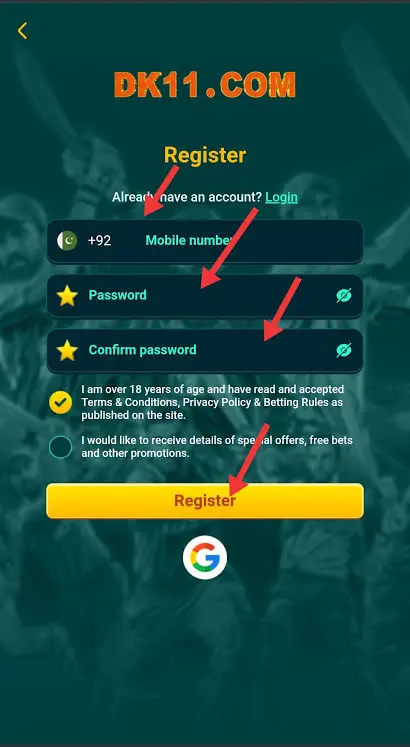
What Is DK11 Register?
DK11 Register is the process of creating a new user account on the DK11 platform. After completing registration, users can use their newly created account credentials to access the DK11 Login page. For first-time visitors, it is important to understand the difference between registration and login. Registration is used to create a new account, whereas login allows existing users to access an account they have already created.
According to the available DK11 FAQ information, the registration process is designed to be straightforward. Users can begin by opening the Register page, entering a Pakistani mobile number, choosing a username and password, and following the instructions to complete the signup process.
Before submitting any personal information, carefully review the instructions and requirements displayed on the current registration page. These details may change over time.
Things to Know Before DK11 Register
Before creating an account, take a moment to check the Register page and read the information displayed there. This helps prevent mistakes during signup.
A few basic points are important:
- Use your own information when completing the Register form.
- Make sure the mobile number you enter is active and accessible to you.
- Create a password that you can remember but that other people cannot easily guess.
- Check the terms and conditions before accepting them.
- Do not create duplicate accounts if the platform allows only one account per player.
The current DK11 terms state that users must be at least 18 years old and that one active account is permitted per player. They also state that account credentials should be kept private.
How to Complete DK11 Register?
The exact appearance of the Register page can change, but the basic process can be explained in a few simple steps.
Step 1: Open the DK11 Register Page
Start by opening the current DK11 Game website or app and look for the Register or Sign Up option.
Choose Register rather than Login if you do not already have an account.
Step 2: Enter Your Mobile Number
The current DK11 Register information identifies a mobile number as part of the signup process. Enter an active number that you can access.
Check the number carefully before continuing because it may be used for account-related verification or recovery.
Step 3: Choose Your Username
Where the current Register form asks for a username, choose one that you can easily remember.
Avoid using information that you would not want other people to know. Also, check the form carefully to see whether the username is available before continuing.
Step 4: Create Your Password
Enter a strong password for your new account. Avoid using very simple combinations or a password that you already use for another important account.
Type the password carefully and confirm it if the Register form asks you to do so.
Step 5: Complete the Register Form
Review all the information you have entered. Only provide information requested by the current DK11 Register form.
Different DK11-related websites currently describe slightly different Register fields, so it is better to follow the actual form on the page rather than assuming that every user will see exactly the same fields.
Step 6: Complete Any Verification Shown
If the Register page asks you to verify your mobile number or enter a verification code, complete that step using the code sent to the registered number.
Do not share verification codes or passwords with another person.
Step 7: Submit the Register
After checking the information, select the final Register, Sign Up, or similar button shown on the page.
If the information is accepted, your new account should be created according to the current Register process.
What Information Is Required?
The clearest current DK11 Register information identifies a mobile number, username, and password as the main signup details.
Other DK11 pages describe additional fields or verification steps, but these are not consistent across the available sites. Therefore, users should rely on the fields displayed on the current Register page rather than assuming that an email address, payment information, identity document, or another detail is always required at signup.
The DK11 terms also state that users must provide accurate information and that identity verification may be requested later.
What Happens After DK11 Register?
After successful Register, you can use the account credentials you created to access the DK11 login page.
The next step is normally to open Login, enter the registered account information, and submit it. Current DK11 login information shows a login process based on the registered account credentials.
Before using the account further, it is a good idea to make sure that:
- Your login details are saved somewhere secure.
- Your registered mobile number remains accessible.
- You understand the platform’s account rules.
- You know how to recover your account if you forget the password.
DK11 Login After Register
Once your DK11 account has been created, you do not need to register again every time you want to access it.
Open the Login page and enter the credentials associated with your account. If you have forgotten your password, current DK11 information provides a Forgot Password option for account recovery.
Always check that you are using the correct login page and avoid entering your password on unfamiliar websites.
Common DK11 Register Problems
Mobile Number Not Accepted
Check that you entered the number correctly and that the number is active. If the page continues to reject it, follow the support instructions available on the current platform.
Verification Code Does Not Arrive
Wait briefly and check whether the number was entered correctly. If a resend option is available, use it rather than repeatedly submitting the form.
Username Is Already Used
Try another username if the Register page says that your chosen username is unavailable.
Register Does Not Submit
Review every field and look for an error message. A missing or incorrectly completed field may prevent the form from being submitted.
Already Have an Account
Do not create another account simply because you cannot access the first one. The current DK11 terms state that each player is allowed one active account. Use the login recovery process or contact the platform’s support service instead.
Basic DK11 Account Guidance
After Register, keep your account details private. Do not give your username, password, or verification code to other people.
It is also important to read the current terms before using the account. DK11’s published terms state that users are responsible for activity carried out through their accounts and should keep their login credentials confidential.
If your account details change or you experience an access problem, use the available account-support or recovery options instead of creating unnecessary duplicate accounts.
Frequently Asked Questions
1. What is DK11 Register?
DK11 Register is the process of creating a new DK11 account. After successful Register, the account can be accessed through the login process.
2. What do I need for DK11 Register?
Current DK11 Register information identifies a mobile number, username, and password as the main signup details. The exact fields can vary, so follow the current Register form.
3. Can I register more than one DK11 account?
The current DK11 terms state that each player is permitted to have one active account. If you cannot access an existing account, use account recovery instead of creating another one.
4. What should I do after DK11 Register?
After Register, keep your account credentials secure and use the Login page to access your new account. You can then review the available account features and settings.
5. What if I cannot complete DK11 Register?
First, check the information entered in every field and look for any message explaining the problem. If the issue continues, use the support option provided by the current DK11 platform.
Final Words
DK11 Register is the account-creation step for new users. The process is generally straightforward, with current DK11 information describing a mobile number, username, and password as the main Register details. Because Register pages can change, users should always follow the fields and instructions shown on the current page rather than relying on an old guide.